React and Github Pages
While I'm enhancing my blog site, I wonder if a React app can also be hosted in Github Pages. I thought of ReactJS because I'm using it as a front-end framework on my work together with ASP.NET as back-end. Of course, I did some research and yes, it is possible. So I'll share with you guys how do I do it.
First, let me show you an introduction for the technologies we will use:
- React - A JavaScript library for building interfaces.
- Git - A fast, scalable, distributed revision control system.
- Github - Web-based Git. Largest development platform.
- Github Pages - Gives hosting for repositories' static websites on Github.
- NodeJS - A JavaScript run-time environment that executes JavaScript code outside of a browser.
- npm - A package manager for JavaSciprt and word's largest registry.
I will assume that NodeJS and Git are already installed in your system, if not go ahead and install with the given links above.
Let start!
- Since I'll just demo how to host a React App in Github pages; I will use the boilerplate, create-react-app, created by Facebook.
On your Node.JS command prompt, enter the following command.
$ npm install -g create-react-app
- After installing the module, let's create a project. I will name it "react-ghpages".
$ create-react-app react-ghpages
- Once installed, open your project folder and run the app.
$ cd react-ghpages
$ npm start
Open http://localhost:3000 to view it in the browser. After the page is loaded, let's proceed on creating the repository in Github.
Go to your Github account and create a new repository. I named my repository the same as the project.

- After creating the repository, let's go back to the project folder. In order to push the codes to Github, we'll initialize the project folder first.
$ git init
$ git add .
$ git commit -m "Initial commit"
- Let's now push the code to your Github repository created a while ago. It will create a master branch and will add the codes into it. Just don't forget to replace the username and repo-name with your own.
$ git remote add origin https://github.com/<username>/<repo-name>.git
$ git push origin master
- Your codes are now online thanks to Github. We'll install another package name "gh-pages" to manage our Github pages.
$ npm install gh-pages --save
- After installing, let's modify the package.json file by adding the following statements. Make sure to replace the username and repo-name with your own.
https://<username>.github.io/<repo-name>
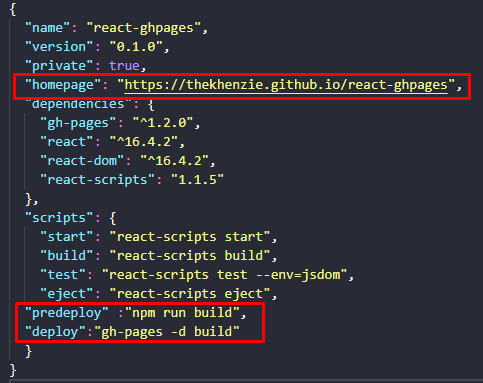
- To deploy, run the script on your package.json
$ npm run deploy
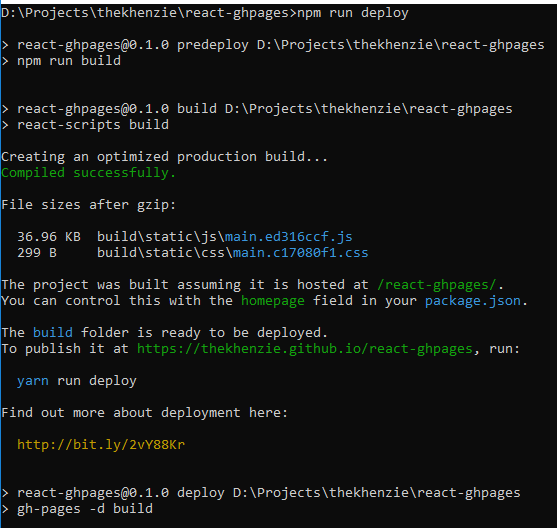
Once published, you can now visit your site.
Even though Github pages only supported static websites, we can easily deploy a React app by compiling it for building purposes. Webpack is reponsible for it since it bundles Javascript files for usage in browser. Gh-pages module on the other hand creates a new branch, "gh-pages" under the repository, pushes the file there, and modifying your repository settings, making the Github Pages environment complete.